
Application has faced an error when entering villages and hideouts

Eskiij

Recruit
Mar 2, 2023
2
1
3
Like header suggests, I get the "application has faced an error and forced to close" error whenever I enter a village or hideout
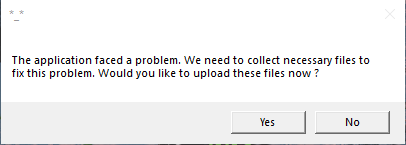
1765991864896.png


I have no issues with battles, towns or arenas and SOME of the hideouts I can enter

But I cannot enter villages, or non-quest hideouts, they all crash the game

Single player game works perfectly, all villages (that i tried) worked in SP but not BO


I have so far:
Verified files
Deleted all files and reinstalled
Updated GPU
Repaired V++
Deleted watchdog and reinstalled
Removed all mods (not that i had any other than BO)
Opened in admin mode
DISM and System Checker

None of this has worked :(
 
Last edited:

moonlight.exe

Administrator
Staff member
Nov 12, 2020
409
199
43
Like header suggests, I get the "application has faced an error and forced to close" error whenever I enter a village or hideout

View attachment 4089


I have no issues with battles, towns or arenas and SOME of the hideouts I can enter

But I cannot enter villages, or non-quest hideouts, they all crash the game

Single player game works perfectly, all villages (that i tried) worked in SP but not BO


I have so far:
Verified files
Deleted all files and reinstalled
Updated GPU
Repaired V++
Deleted watchdog and reinstalled
Removed all mods (not that i had any other than BO)
Opened in admin mode
DISM and System Checker

None of this has worked :(
Hello, did you try to lowr your graphic settings?
 
  • Like
Reactions: Eskiij

Eskiij

Recruit
Mar 2, 2023
2
1
3
Thanks for the reply!

Yes I did but to no avail

I have however found a solution that seems to be working!

I forced the game to open with DX11 instead of DX12 by changing the .ini file

Here are the steps, incase it helps anyone else!


Step 1 — Locate the config file
Path:
Documents\Mount and Blade II Bannerlord\Configs\engine_config.txt

Step 2 — Open the file
Right-click engine_config.txt → Open with Notepad (or any text editor)

Step 3 — Find / add the DX12 line
Look for:
use_dx12 = 1

If it exists, change it to:
use_dx12 = 0

If it doesn’t exist, add this line anywhere in the file:
use_dx12 = 0

Step 4 — Save and close
Save the file
Close Notepad

Step 5 — Launch Bannerlord Online
Right-click → Run as administrator
 
  • Like
Reactions: xretix

moonlight.exe

Administrator
Staff member
Nov 12, 2020
409
199
43
Thanks for the reply!

Yes I did but to no avail

I have however found a solution that seems to be working!

I forced the game to open with DX11 instead of DX12 by changing the .ini file

Here are the steps, incase it helps anyone else!


Step 1 — Locate the config file
Path:
Documents\Mount and Blade II Bannerlord\Configs\engine_config.txt

Step 2 — Open the file
Right-click engine_config.txt → Open with Notepad (or any text editor)

Step 3 — Find / add the DX12 line
Look for:
use_dx12 = 1

If it exists, change it to:
use_dx12 = 0

If it doesn’t exist, add this line anywhere in the file:
use_dx12 = 0

Step 4 — Save and close
Save the file
Close Notepad

Step 5 — Launch Bannerlord Online
Right-click → Run as administrator
Thank you so much for your detailed response on this matter! Might be helpful.
 
  • Like
Reactions: xretix